How Snagit for Mac is sold today
According to TechSmith's store at the time of writing, the individual plan is a subscription billed per user per year, and personal subscriptions are non-transferable. It includes macOS 14+ and Windows 10/11 support, a 14-day money-back guarantee and hosting for up to 25 videos on Screencast. Snagit is also bundled with Camtasia plans. The store shows prices in local currency, so the exact figure depends on where you buy.
There's a free trial; per TechSmith's download page, it needs a TechSmith account, no credit card, and is for evaluation only — not commercial work.
ShotDock is $12 once. The licence never expires, updates are included, it works on up to 3 of your Macs and commercial use is allowed. The 14-day trial has every feature and doesn't ask for an account.
What both apps do
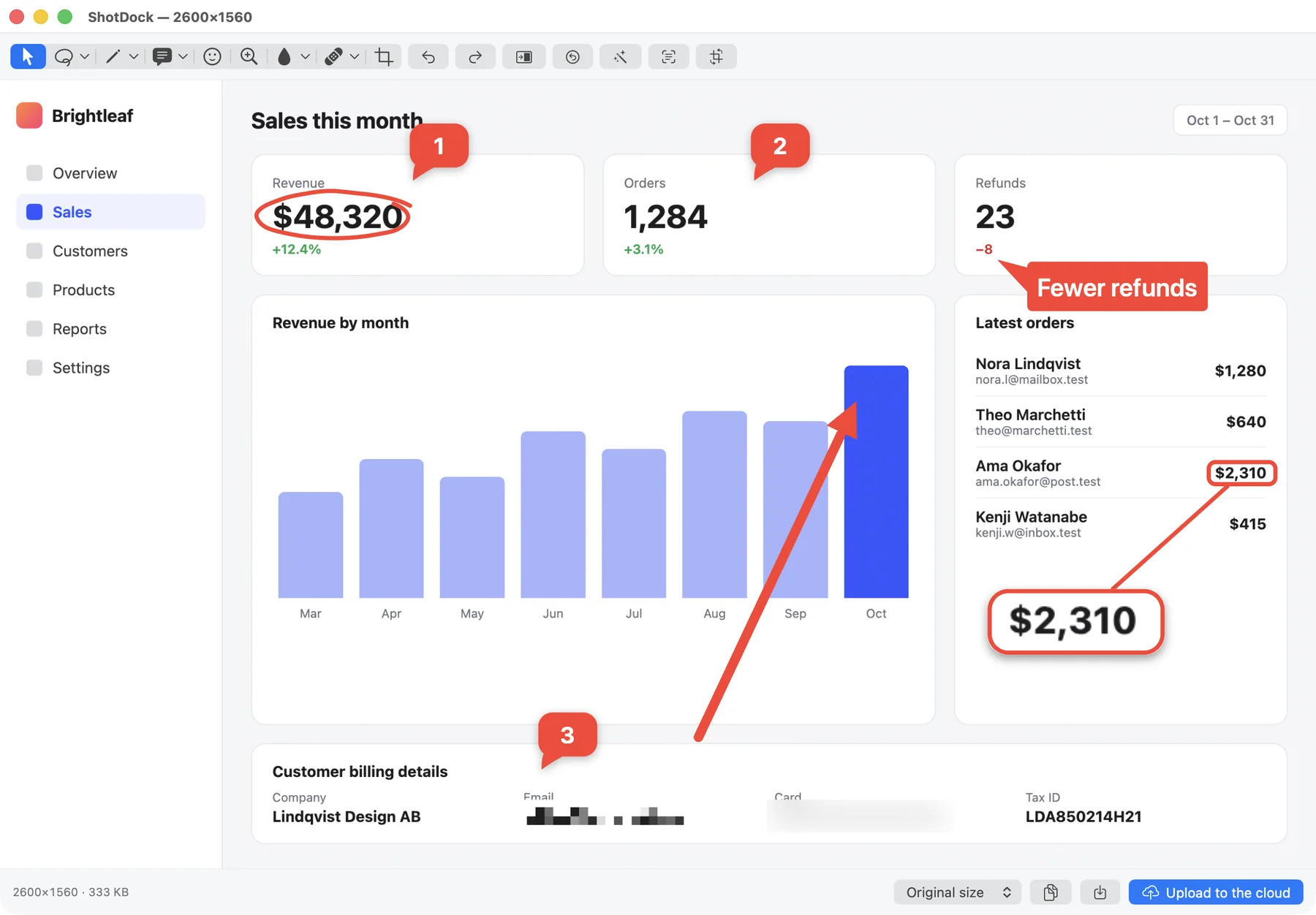
For day-to-day work the overlap is large. Both capture an area, a window or the full screen; both do scrolling captures of long pages; both annotate with arrows, text and callouts, and hide sensitive details; both record your screen with microphone, system audio and webcam; and both give you a share link.
In ShotDock that's ⇧ ⌘ 0 / 9 / 8 to capture an area, window or screen, ⌃ ⌘ with the same numbers to record, and ⇧ ⌘ 7 for a scrolling capture. In the editor, Esc copies and closes, ↩ saves, and ⌘ ↩ uploads and leaves the link on your clipboard.
Snagit vs ShotDock
| Snagit | ShotDock | |
|---|---|---|
| Pricing model | Yearly subscription per user | $12 once, lifetime licence |
| Platforms | macOS 14+ and Windows | macOS 14+, Apple Silicon only |
| Scrolling capture | Yes | Yes |
| Arrows, text, callouts | Yes | Yes, plus numbered steps, magnifier, 638 stickers |
| Automatic step-by-step guides from clicks | Yes (Step Capture) | No |
| Redact sensitive data | Yes (Smart Redact) | Manual pixelate and blur |
| Content-aware erase, dust removal, clone, warp | Not advertised | Yes |
| Screen recording with mic, system audio, webcam | Yes | Yes |
| Trim and combine videos | Yes | No — record, pause and resume instead |
| Searchable capture library | Yes | No — files go where you save them |
| Sharing | Screencast (25 videos included) | ShotDock cloud or your own S3 |
| Trial | Free trial, account required, no commercial use | 14 days, every feature, no account |
Snagit features are taken from techsmith.com at the time of writing.
When Snagit is the better choice
- You document processes for a living. Step Capture turning clicks into a guide, Themes for consistent styling and the extra template packs (Snagit Assets) save real time for trainers and technical writers.
- You work on Windows and Mac. Snagit runs on both; ShotDock is Mac-only and needs Apple Silicon.
- You want a library. Snagit keeps every capture searchable in one place.
- You edit your recordings. Snagit trims and combines clips and reduces background noise; with Camtasia on top you get a full video editor.
- Your company manages licences centrally and already has a TechSmith agreement.
When ShotDock is the better choice
- You don't want another subscription. $12 once, updates included, on 3 Macs.
- You fix images, not just mark them up. Erase an object and rebuild the background (E), sweep dust off a scan (J), clone, warp, dodge/burn, auto enhance — photo-editor tools inside the screenshot editor. See the screenshot editor guide.
- You want small videos to paste in a chat. ShotDock records MP4 at one pixel per point by default instead of full Retina, with a circle or rectangle webcam you can move while recording.
- You want your files in your own storage — an S3 bucket on AWS, Backblaze B2, Cloudflare R2 or MinIO — or nowhere but your disk.
- You want a light, native app. ShotDock is built for Apple Silicon and is under 5 MB.
Already own an older Snagit licence? Keep using it if it does what you need. The case for switching is strongest when you're about to start or renew a subscription.
Frequently asked questions
Is Snagit for Mac a subscription now?
Yes. At the time of writing, TechSmith's store lists the individual plan as billed per user per year, and doesn't offer a one-time licence for new buyers. The price shown depends on your country, so check TechSmith's store for yours.
Is there a free Snagit alternative for Mac?
macOS includes a capable screenshot tool: Shift-Command-5 captures an area, a window or the screen, and records video with your microphone. It has only basic markup, no scrolling capture and no Mac audio in recordings. Our guide to the Snipping Tool on Mac covers the built-in options. Shottr can also be used for free, with upgrade prompts, if you only need screenshots.
Does Snagit work on Mac and Windows with one subscription?
Snagit runs on both macOS and Windows; TechSmith's store lists macOS 14 or later and Windows 10 and 11. ShotDock is Mac-only, so if you switch between platforms, Snagit is the one that follows you.
Can ShotDock replace Snagit's step-by-step guides?
Partly. ShotDock has numbered steps (S), arrows, callouts and a magnifier for annotating each screenshot, but it doesn't build a guide from your clicks automatically the way Snagit's Step Capture does.
How does sharing compare?
Snagit plans include hosting for up to 25 videos on TechSmith's Screencast. ShotDock uploads to its own cloud (with the licence, 5 uploads a day kept 30 days; $19 a year for video and no daily cap) or to your own S3 bucket with no limits, and copies the link to your clipboard.
Try ShotDock free for 14 days
Every feature unlocked, no account. If you keep it, it's $12 once — no subscription.