What CleanShot X costs today
From CleanShot's pricing page, at the time of writing:
- CleanShot Basic — $35 one-time. The Mac app, one year of updates and 1 GB of CleanShot Cloud storage. After the first year, updates are an optional renewal at $19 a year.
- CleanShot Pro — $12 per user per month, billed annually. Always up to date, unlimited cloud storage, custom domain and branding, team management, SSO.
There's no trial (there is a 30-day money-back guarantee), and it requires macOS 13 or later. If you want the latest version every year, Basic works out to $35 the first year and $19 every year after — three years is $73.
ShotDock is $12 once. Updates are included, for good, on up to 3 of your Macs, commercial use allowed. It needs macOS 14 or later and an Apple Silicon Mac.
Feature by feature
| CleanShot X | ShotDock | |
|---|---|---|
| Price | $35, then $19/yr for updates (optional) | $12 once, updates included |
| Area, window, full-screen capture | Yes | Yes |
| Scrolling capture | Yes | Yes, scrolling down or up |
| OCR | Yes, plus QR codes | Yes, on-device |
| Annotation, step numbers, redaction | Yes | Yes, plus magnifier, pixelate, blur |
| Erase objects and rebuild the background | No | Yes |
| Dust removal, clone, warp, dodge/burn | No | Yes |
| Screen recording with audio | Yes, video or GIF | Yes, MP4 at the resolution you pick |
| Webcam overlay | Yes | Yes, circle or rectangle |
| Show keystrokes and clicks in recordings | Yes | No |
| Upload to your own S3 bucket | No, CleanShot Cloud | Yes, or the ShotDock cloud |
| Trial | No (30-day refund) | 14 days, every feature |
CleanShot features come from what its own site advertises. If something changed, the CleanShot site is the source of truth.
Where ShotDock is different
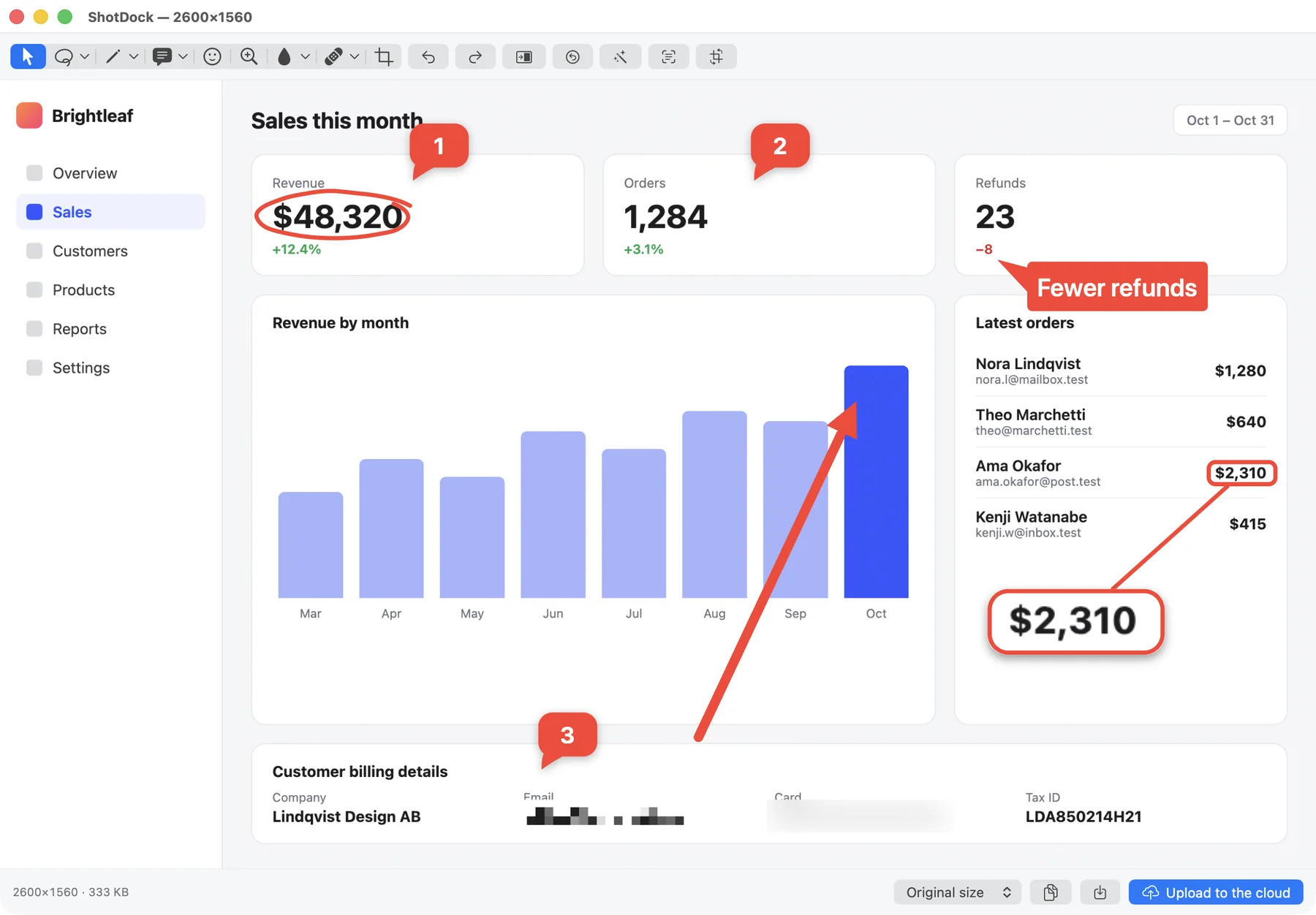
A photo retoucher inside the screenshot editor
This is the part no other screenshot app ships. Press E and paint over a watermark, a logo or a stray notification: ShotDock removes it and rebuilds the background from its surroundings, keeping the grain. J sweeps dust specks off a scan without touching the text. There's also clone (K), warp (W), dodge/burn (D), pinch/bloat (G) and a one-key auto enhance (⌘ E). Things you'd normally open Pixelmator or Photoshop for. More in our guide to the screenshot editor on Mac.
Your own storage, if you want it
CleanShot uploads to CleanShot Cloud. ShotDock gives you two options from the menu bar: its own cloud with no setup, or your own S3 bucket (AWS, Backblaze B2, Cloudflare R2, MinIO). With your bucket, files go straight from your Mac to your provider and nothing expires. With the ShotDock cloud, the licence includes 5 uploads a day kept for 30 days; the optional $19-a-year plan removes the daily cap and adds video, with 25 GB.
Recordings sized for sharing
ShotDock records at one pixel per point by default (capped at 1920 wide) instead of full Retina, so a tutorial that ends up in Slack isn't a 400 MB file. You choose half, normal or Retina and 15/30/50/60 fps, with Mac sound, mic or both, and you see the expected size before you hit record. See how to screen record on a Mac.
When CleanShot X is the better choice
- You make GIFs. ShotDock records MP4 only.
- Your recordings are tutorials where keystrokes and clicks need to show. CleanShot displays them; ShotDock doesn't.
- You like polished "marketing" screenshots with backgrounds, padding and shadows — CleanShot's background tool is built for that.
- You pin screenshots on screen as floating references while you work, or hide desktop icons before capturing.
- Your team wants managed cloud sharing with comments, custom domains, SSO and admin controls (CleanShot Pro).
- You're on an Intel Mac or macOS 13. ShotDock needs Apple Silicon and macOS 14.
- You already pay for Setapp, where CleanShot X is included.
When ShotDock is the better choice
- You want every future update without a yearly renewal, for $12.
- You regularly clean up screenshots and scans — removing objects, dust, personal details — not just annotate them.
- You want uploads in your own bucket, or no cloud at all.
- You want to try everything first: 14 days, no account, no card.
Frequently asked questions
How much does CleanShot X cost?
At the time of writing, CleanShot's pricing page lists CleanShot Basic at $35 one-time, which includes the Mac app, one year of updates and 1 GB of cloud storage. Updates after the first year are an optional $19 a year. CleanShot Pro, with unlimited cloud storage and team features, is $12 per user per month billed annually. It's also included in Setapp.
Does CleanShot X stop working after a year?
No. According to CleanShot, the renewal is optional: you keep using the version you have; you just stop getting new versions until you renew.
Is there a free trial of CleanShot X?
CleanShot's FAQ says they don't offer a trial, but there's a 30-day money-back guarantee, and Setapp has a 7-day free trial. ShotDock has a 14-day trial with every feature and no account.
CleanShot X vs Shottr: which one?
Shottr is the cheaper, lighter option (usable free with upgrade prompts, $12 one-time for the full licence and commercial use) and is excellent for screenshots, but it doesn't record video. CleanShot X records video and GIFs and has more polish around sharing. ShotDock sits between them on price and records video too. See our Shottr alternative page for that comparison.
Can I try ShotDock alongside CleanShot X?
Yes. ShotDock uses ⇧⌘0 for an area, ⇧⌘9 for a window and ⇧⌘8 for the full screen, plus ⌃⌘ with the same numbers to record. If those collide with your CleanShot shortcuts, change one set and compare the two side by side during the 14-day trial.
Try ShotDock free for 14 days
Every feature unlocked, no account. If you keep it, it's $12 once — no subscription.