What Loom costs, and what you get for it
According to Loom's pricing page at the time of writing, there are three self-serve tiers:
- Starter (free): 25 videos per person, screen recordings up to 5 minutes, video up to 720p.
- Business: $18 per user per month — unlimited recording length, up to 4K, download your videos.
- Business + AI: $24 per user per month — adds auto summaries, chapters, filler-word removal and meeting notes.
Every plan includes the screen-and-camera bubble, system audio, comments and emoji reactions, and viewer insights. That's a solid product. The catch is the model: it's a subscription per person, and your videos live in Loom's library. If you only send a few walkthroughs a week, $18 a month adds up to $216 a year for something you use as a recorder plus a link.
Doing the same job with ShotDock
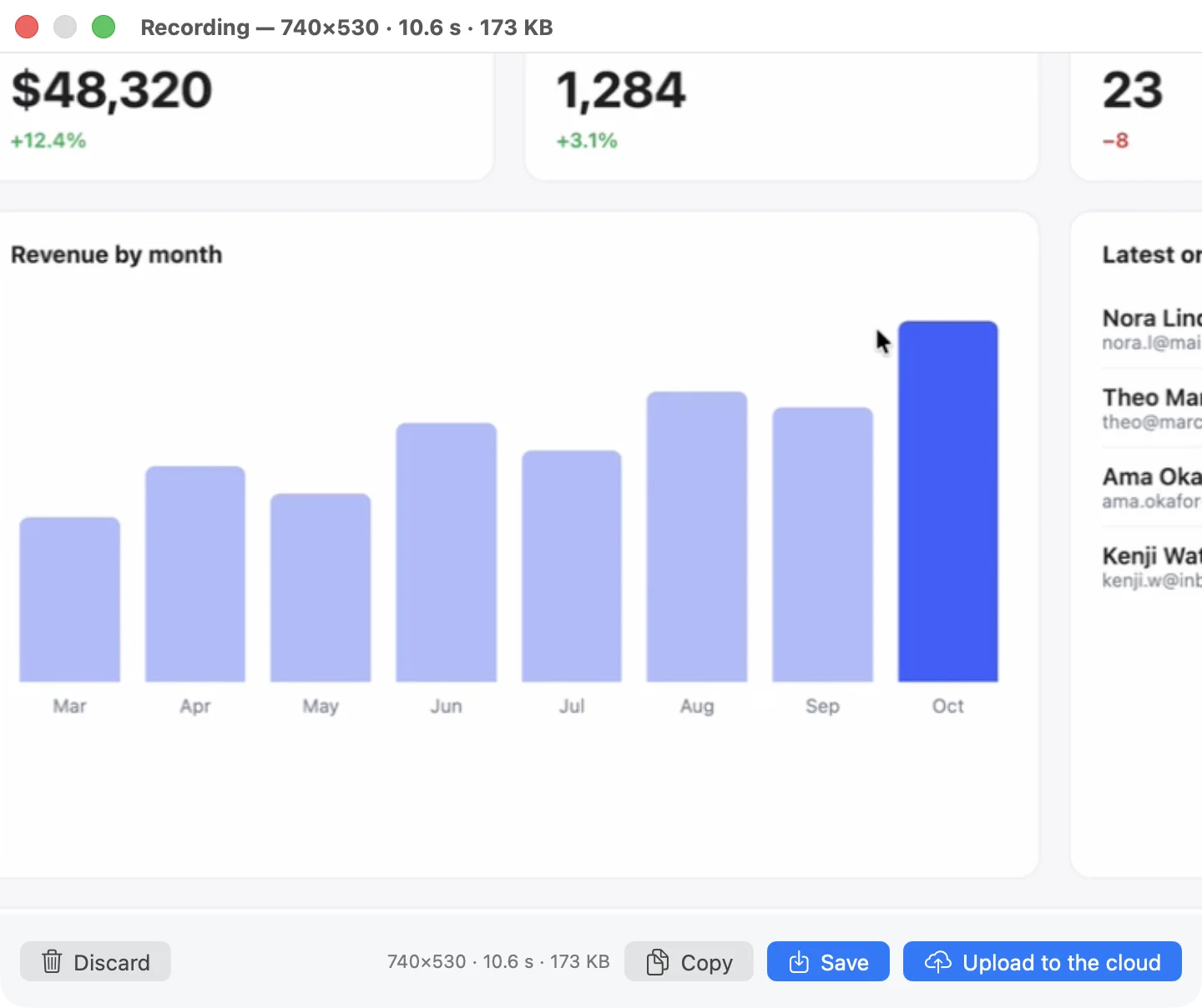
ShotDock is a native Mac app for screenshots and screen recording. For Loom-style videos the flow is:
- Press ⌃ ⌘ 0 to record an area or ⌃ ⌘ 8 for the whole screen.
- In the bar that appears, choose audio (Mac sound, microphone, or both mixed), camera (circle or rectangle), resolution and frame rate. It tells you how big the file will be before you start.
- Record. Drag your camera out of the way at any point; pause and resume with ⌃ ⌘ P and the video comes out continuous.
- Stop, then Upload. The link is on your clipboard; paste it into Slack, an issue or an email.
The file is an MP4 at one pixel per point by default (capped at 1920 wide), so a few minutes of tutorial is small and plays in any browser. You can also just save it or copy the file — nothing forces it through a cloud.
Where the link points is your choice. The ShotDock cloud needs no setup; links expire after 7, 30, 90 or 365 days. Or use your own S3 bucket (AWS, Backblaze B2, Cloudflare R2, MinIO) and nothing expires unless you want it to.
Loom vs ShotDock
| Loom | ShotDock | |
|---|---|---|
| Pricing model | Free tier, then $18–24 per user per month | $12 once, up to 3 Macs |
| Webcam bubble | Yes | Yes: circle or rectangle, movable while recording |
| Mac sound + microphone | Yes | Yes, separately or mixed |
| Share link | Yes, in Loom's library | Yes: ShotDock cloud or your own S3 |
| Recording length on the free option | 5 minutes (Starter) | No limit (14-day trial, then paid) |
| Viewer analytics, comments, reactions | Yes | No |
| AI summaries and chapters | Business + AI plan | No |
| Windows, Chrome extension, mobile | Yes | Mac only (macOS 14+, Apple Silicon) |
| Screenshot editor (retouching, OCR, scrolling capture) | Not its focus | 20+ tools, OCR, scrolling capture |
| Account required | Yes | No |
When Loom is the better choice
Be honest with yourself about what you use Loom for. Stay with it if:
- You need to know who watched. View counts and engagement insights are central to Loom; ShotDock has none.
- Feedback happens on the video. Time-stamped comments and reactions keep the conversation next to the recording.
- Your team is on Windows or Chromebooks, or records from the browser. ShotDock is a Mac app and needs Apple Silicon.
- You want a shared team library with workspaces, permissions and admin controls.
- The AI features matter — automatic titles, summaries, chapters and filler-word removal.
When ShotDock is the better choice
- You're one person, or a small team on Macs, and you'd rather not pay per seat every month. $12 once, plus $19 a year only if you want video on the ShotDock cloud — or nothing extra with your own bucket.
- You want the file, not just a link. Every recording is a normal MP4 on your disk.
- Your videos are short how-tos and bug reports, where pause/resume, Mac audio and a small file matter more than analytics.
- You also take a lot of screenshots. The same app captures, annotates (arrows, numbered steps, magnifier, blur) and uploads stills, which Loom isn't built for. See the screenshot editor.
- Privacy matters. With your own S3 bucket the file goes straight from your Mac to your provider; ShotDock never sees it.
What about a free Loom alternative?
If the budget is zero, macOS already records the screen with ⇧ ⌘ 5, and QuickTime can float your camera on top. The limits are real: no Mac audio, a big Retina-sized .mov, and no link. Our guide on how to screen record on a Mac walks through that setup. Loom's free Starter plan is the other option if 5-minute videos are enough. More free options are compared in free screen recorders for Mac.
Frequently asked questions
Is there a free Loom alternative for Mac?
The free one is already on your Mac: Shift-Command-5 records the screen and your microphone, and QuickTime can float your webcam on top. It won't record the Mac's own sound or give you a link, though. Loom's own Starter plan is free too, with limits (at the time of writing: 25 videos, 5 minutes each, up to 720p). ShotDock isn't free, but the 14-day trial has every feature, video uploads included, and no account.
Can ShotDock record my webcam like Loom's bubble?
Yes. Before recording an area or the full screen, pick Camera → Circle or Rectangle. The camera appears in the bottom-right corner; drag it anywhere, even while recording, and double-click to resize it. The overlay isn't available when you record a single window.
How do people watch a ShotDock video?
It's a regular MP4 (H.264) behind a link, so it plays in any browser without an app or an account. Upload to the ShotDock cloud or to your own S3 bucket and the link is copied to your clipboard.
Does ShotDock have viewer analytics or comments like Loom?
No. There are no view counts, reactions or comment threads. If you need to know who watched or collect feedback on the video itself, Loom is the better tool.
How much does sharing videos cost with ShotDock?
The app is $12 once. During the trial you can upload anything. After that, video links on the ShotDock cloud need the optional $19-a-year plan (25 GB, no daily cap), or you can point ShotDock at your own S3 bucket — AWS, Backblaze B2, Cloudflare R2 or MinIO — and pay only your provider.
Try ShotDock free for 14 days
Every feature unlocked, no account. If you keep it, it's $12 once — no subscription.